Saturday, 19 May 2018

Web Farm and Web Garden

Overview

Visual Studio has its own integrated ASP.NET engine which is used to run the ASP.NET Web application from Visual Studio. ASP.NET Development Server is responsible for executing all the requests and responses from the client. Now after the end of development, when you want to host the site on some server to allow other people to access, concept of web servers comes in between. A web server is responsible for providing the response for all the requests that are coming from clients. The below diagram shows the typical deployment structure of an ASP.NET Web application with a single IIS.
2
Clients request for resources and IIS process the request and send back to clients. If you want to know more details on How IIS Processes the request, please read one of my articles about “How IIS Process ASP.NET Request?”.

Web Farm

This is the case where you have only one web server and multiple clients requesting for resources from the same server. But when are is huge amount of incoming traffic for your web sites, one standalone server is not sufficient to process the request. You may need to use multiple servers to host the application and divide the traffic among them. This is called “Web Farm”. So when you are hosting your single web site on multiple web servers over load balancer is called “Web Farm”. The below diagram shows the overall representation of Web Farms.
Web Farms
In general web farm architecture, a single application is hosted on multiple IIS Server and those are connected with the VIP (Virtual IP) with Load Balancer. Load Balancer IPs are exposed to external world to access. So whenever some request will come to server from clients, it will first hit the Load Balancer, then based on the traffic on each server, LB distributes the request to the corresponding web server. These web servers may share the same DB server or may be they can use a replicated server in the back end.
So, in a single statement, when we host a web application over multiple web servers to distribute the load among them, it is called Web Farm.

Web Garden

Now, let’s have a look at what is Web Garden? Both the terms sound the same, but they are totally different from each other. Before starting with Web Garden, I hope you have a fundamental idea of what an Application Pool is and what a Worker Process is. If you have already read the article, “How IIS Processes ASP.NET Request ?”, then I can expect that you now have a good idea about both of them.
Just to recall, when we are talking about requesting processing within IIS, Worker Process (w3wp.exe) takes care of all of these. Worker Process runs the ASP.NET application in IIS. All the ASP.NET functionality inside IIS runs under the scope of worker process. Worker Process is responsible for handling all kinds of request, response, session data, cache data. Application Pool is the container of worker process. Application pool is used to separate sets of IIS worker processes and enables a better security, reliability, and availability for any web application.
apppools
Now, by default, each and every Application pool contains a single worker process. Application which contains the multiple worker process is called “Web Garden”. Below is the typical diagram for a web garden application.
WebGarden Basic
In the above diagram, you can see one of the applications containing the multiple worker processes, which is now a web garden.
So, a Web application hosted on multiple servers and access based on the load on servers is called Web Farms and when a single application pool contains multiple Worker processes, it is called a web garden.

Advantages of Web Farm

  • It provides high availability. If any of the servers in the farm goes down, Load balancer can redirect the requests to other servers.
  • Provides high performance response for client requests.
  • Provides better scalability of the web application and reduces the failure of the application.
  • Session and other resources can be stored in a centralized location to access by all the servers.

Advantages of Web Garden

  • Provides better application availability by sharing requests between multiple worker process.
  • Web garden uses processor affinity where application can be swapped out based on preference and tag setting.
  • Less consumption of physical space for web garden configuration.

Summary

When we host a web application over multiple web servers to distribute the load among them, it is called Web Farm and when one application has multiple worker processes, it is called a Web garden.

Monday, 30 April 2018

IQ


  • Why can't static classes have non-static methods and variables?
  1.  Static classes can't be instantiated in the first place, so even if you could declare non-static (instance) members, they can never be accessed. Since there really isn't a point allowing it for that reason, the language simply prohibits it.
  2. A non-static class can have both static and non-static members so that the static members apply to the class, 
  • whereas the non-static members apply to the instances of that class.
  • Difference between a property and variable
  • The following table shows some important differences between variables and properties.
    Point of differenceVariableProperty
    DeclarationSingle declaration statementSeries of statements in a code block
    ImplementationSingle storage locationExecutable code (property procedures)
    StorageDirectly associated with variable's valueTypically has internal storage not available outside the property's containing class or module

    Property's value might or might not exist as a stored element 1
    Executable codeNoneMust have at least one procedure
    Read and write accessRead/write or read-onlyRead/write, read-only, or write-only
    Custom actions (in addition to accepting or returning value)Not possibleCan be performed as part of setting or retrieving property value
  • difference between a DataTable and a DataReader
  • DataReader
    1. Its an connection oriented, whenever you want fetch the data from database that you need the connection. after fetch the data connection is diconnected. 
    2. Its an Read only format, you cann't update records. 


    DataSet
    1. Its connectionless. whenever you want fetch data from database. its connects indirectly to the database and create a virtual database in local system. then disconnected from database.
    2. Its easily read and write data from virtual database.

    DataTable
    A DataTable object represents a single table in the database. It has a name rows and columns.
    There is not much difference between dataset and datatable, dataset is just the collection of datatables.

  • Difference between var and dynamic
vardynamic
Introduced in C# 3.0
Introduced in C# 4.0
Statically typed – This means the type of variable declared is decided by the compiler at compile time.
Dynamically typed - This means the type of variable declared is decided by the compiler at runtime time.
Need to initialize at the time of declaration.
e.g., var str=”I am a string”;
Looking at the value assigned to the variable str, the compiler will treat the variable str as string.
No need to initialize at the time of declaration.
e.g., dynamic str; 
str=”I am a string”; //Works fine and compiles
str=2; //Works fine and compiles
Errors are caught at compile time.
Since the compiler knows about the type and the methods and properties of the type at the compile time itself
Errors are caught at runtime 
Since the compiler comes to about the type and the methods and properties of the type at the run time.
  • Difference Between Constant and ReadOnly and Static
Const
Const is nothing but "constant", a variable of which the value is constant but at compile time. And it's mandatory to assign a value to it. By default a const is static and we cannot change the value of a const variable throughout the entire program.

Readonly
Readonly is the keyword whose value we can change during runtime or we can assign it at run time but only through the non-static constructor. Not even a method. Let's see:

Static ReadOnly
A Static Readonly type variable's value can be assigned at runtime or assigned at compile time and changed at runtime. But this variable's value can only be changed in the static constructor. And cannot be changed further. It can change only once at runtime. Let's understand it practically.

Static 

The static keyword is used to declare a static member. If we are declare a class as a static class then in this case all the class members must be static too. The static keyword can be used effectively with classes, fields, operators, events, methods and so on effectively.
  • Default visibility for C# classes and members (fields, methods, etc.)?
  • Default access modifier of class is Internal. And private for class member.

Members of    Default member accessibility
----------    ----------------------------
enum          public
class         private
interface     public
struct        private


  • What is the difference between <%# Bind(“”) %> and <%# Eval(“”) %> in ASP.NET?
EVal is one way binding, Bind is two way
If you bind a value using Eval, it is like a read only. You can only view the data.
If you bind a value using Bind, and if you do some change on the value it will reflect on the database also


  • Jquery Method chaining
To chain an action, you simply append the action to the previous action.
The following example chains together the css(), slideUp(), and slideDown() methods. The "p1" element first changes to red, then it slides up, and then it slides down:

$("#p1").css("color", "red").slideUp(2000).slideDown(2000);


  • Where is viewstate information stored (server or client)? and in which format?

            By default the ViewState will be stored in the html page and will be submitted to the server    when the user submit that page again, then the server will extract the ViewState from the Submitted form, and populate the ViewState bag

C# Program to Calculate the Power Exponent Value

  1. /*
  2.  *  C# Program to Calculate the power exponent value
  3.  */
  4. using System;
  5. class Program
  6. {
  7.     static void Main()
  8.     {
  9.  
  10.         double m, n;
  11.         Console.WriteLine("Enter the Number : ");
  12.         m = double.Parse(Console.ReadLine());
  13.         Console.WriteLine("Enter the Exponent : ");
  14.         n = double.Parse(Console.ReadLine());
  15.         double value1 = Math.Pow(m, n);
  16.         Console.WriteLine("Result : {0}", value1);
  17.         Console.ReadLine();
  18.     }
  19. }

2nd method

public static void Main()
        {
            double m, n,y=1;
            Console.WriteLine("Enter the Number : ");
            m = double.Parse(Console.ReadLine());
            Console.WriteLine("Enter the Exponent : ");
            n = double.Parse(Console.ReadLine());

            for (int i = 0; i < n; i++)
            {
                y = y * m;

            }

            Console.WriteLine(y);
            Console.ReadLine();
        }
Here is the output of the C# Program:
Enter the Number : 2
Enter the Exponent :3
Result : 8
  • Define Custom Route
  • How to get cell value of gridview using JQUERY

<script type="text/javascript">
        $(document).ready(function() {
            var list = "";
            $("#btnGet").click(function() {
                $("#<%=GridView1.ClientID %> tr").each(function() {
                    //Skip first(header) row
                    if (!this.rowIndex) return;
                    var age = $(this).find("td:last").html();
                    list += age + "</br>";

                });
                $("#listAge").html(list)
            });

        });
    </script>

  • WCF Service Instancing

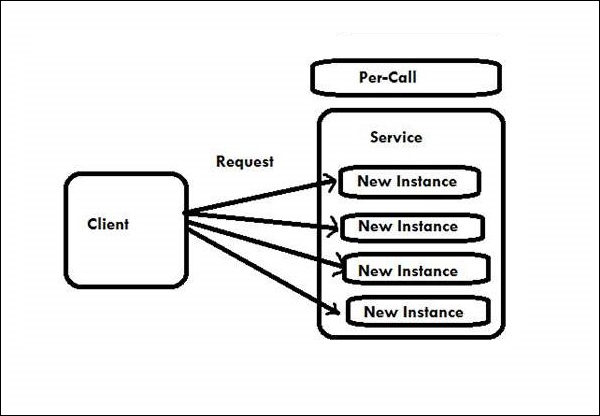
PerCall: A new service object is created for each call to the service.
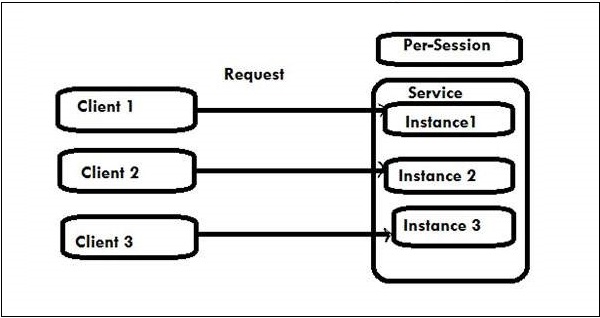
 PerSession: A new service object is created for each client. This is the default behavior.
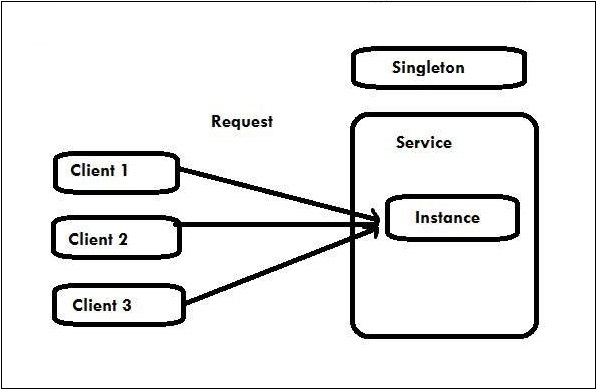
 Single: A single service object is created for all calls from all clients.

[ServiceBehavior(InstanceContextMode= InstanceContextMode.PerCall)]

public class PerCallService :IPerCallService

[ServiceBehavior(InstanceContextMode= InstanceContextMode.PerSession)]

PerSession is the default instancing mode for WCF.


public class PerSessionService:IPerSessionService

[ServiceBehavior(InstanceContextMode= InstanceContextMode.Single)]

public class SingletonService:ISingletonService

Wcf Instance Management Per Call Service
Wcf Instance Management Per Session Service
Wcf Instance Management Singleton Service

Wednesday, 25 April 2018

Roles and responsibilities in your current Project

Role : Sr.Software Engineer
Responsibilities :
Ø  designing S/W Design Docs
Ø  Understanding clients business requirements and Expectations
Ø  identifying testable requirements ,Test Scenarios 
Ø  Involved in designing , updating and enhance test cases
Ø  Requirement mapping , preparation of RTM columns  and Test data
Ø  Preparation of test Environment and  test Execution 
Ø  Bug Tracking and reporting (QC)
Ø  Involved in Smoke testing ,Gui testing ,Regression testing, Retesting , Data driven testing
Ø  participated in peer reviews ,periodic project meetings and check in calls with the clients
Ø   involved in producing test deliverable 
Ø  Collect the requirments from the client 
Ø   Analyse these requirment , close the discupencies with client
Ø   Assign the task to developers and track them for clouser
Ø   Code review
Ø   Preperaing release documents to client
Ø  Design, develop and implement applications that support day-to-day operations.
Ø  Provide innovative solutions to complex business problems.
Ø  Plan, develop and implement large-scale projects from conception to completion.
Ø  Develop and architect lifecycle of projects working on different technologies and platforms.
Ø  Interface with clients and gather business requirements and objectives.
Ø  Translate clients’ business requirements and objectives into technical applications and solutions.
Ø  Understand and evaluate complex data models.
Ø  Execute system development and maintenance activities.
Ø  Develop solutions to improvise performance and scalability of systems.

Why do you want to leave your current job
Ø  I quit my job to pursue new opportunities and take a new step in my career.
Ø  Desire to learn.
Ø  Desire to take on more responsibility.
Ø  Desire to take on less responsibility.
Ø  Desire to relocate.
Ø  Desire for a career change.
Ø  Desire to gain a new skill or grow a current skill.
Ø  Company reorganization has led to change in job content.
Ø  Desire for a shorter commute to work.
Ø  Desire to improve work/life balance.